
By deploying a CallHarbor business phone system early on in the lifetime of your business, we will provide the features you need as your company grows. Your system will always be up to date, your hardware will be the latest & greatest, and our 24/7 support is evergreen. You may think it’s not the right time to switch to the cloud, or that your current phone system is fine the way it is. Once you experience the services and features of UCaaS, you’ll never look back! Business communication needs are everchanging – is your business ready to keep up?
CallHarbor Fits Your Current & Future Communication Needs
Whether your business is using an outdated POTS service, or utilizing personal cell phones… there is a better way. You may be able to get by using Google Voice, Slack, or cell phones as a starting business, but the need will grow. It is not the best solution, and you don’t get nearly the support you need. Your customer support team may be one or two people using smartphones to answer calls from your first customers. As you expand the team with new hires, it will become too much to keep that your ‘customer support line.’ If you have teams such as HR, having them conduct company business on a personal phone doesn’t look professional.
Utilizing CallHarbor for your communications gives you a polished & professional appearance. Not to mention with our DaaS, you’ll always have the latest and greatest hardware. With CallHarbor, you also have access to free local numbers. If you want something fancier, you can even conduct a one time purchase to choose a number that suits you more. As your sales and support calls come in, you can have them set up to go through a Ring Group or even an external number.
Included in your CallHarbor plan, you also get access to a single dial in conference number. This will make conference calls a breeze for you an your team. You’ll even be able to see who called in to the conference call, what number they called in from, and how long they were on the meeting. Having access to big time reporting at any size is both impressive and useful.
Use Softphones to Conduct Business From Anywhere
A web softphone is a phone or feature for making telephone calls over the Internet using a computer rather than dedicated phone hardware. The softphone can be utilized through our internet web portal on a desktop, mobile device, or other computer, and also functions in the same way as our web softphone on the mobile app. It allows the user to place and receive calls, see their coworkers’ online status, and engage in chat and SMS.
By using a web softphone, employees don’t have to be tied to their desk or cubicle to utilize their work phone number or all the other great VoIP phone system features. Web softphones are a great feature to utilize for flexible or remote workers. The features within the web softphone in the CallHarbor portal are helpful to office workers and remote workers alike. You can start new phone calls right from the web softphone, begin new chat or SMS conversations with your coworkers, see your coworkers’ availability statuses, view your settings and toggle answering rules and greetings, and even more.
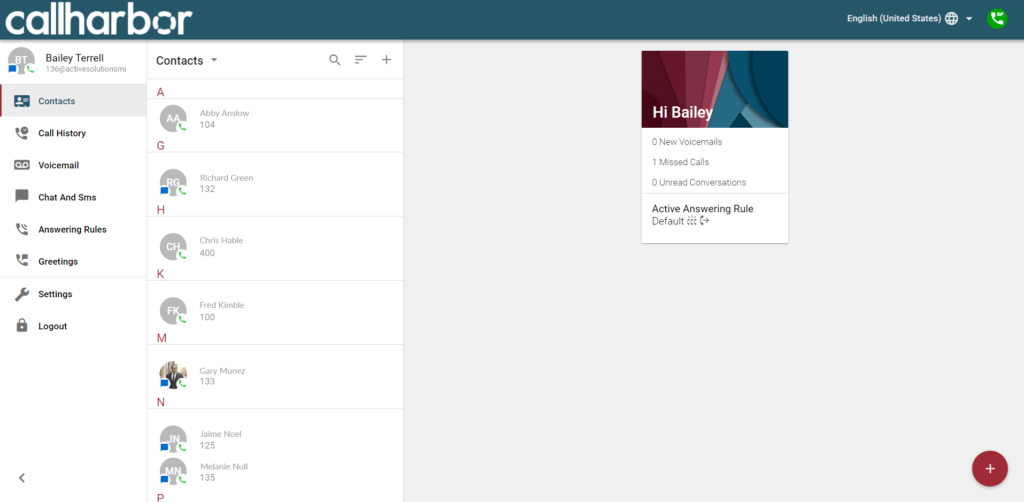
There are many advantages to using softphones over desk phones. They are typically less expensive (or free, in CallHarbor’s case) than purchasing physical phones. They also allow you to use our service wherever you are working: at an office, your home, or even a hotel room. Just log into from any browser on your laptop or mobile device and start making calls/sending SMS. Check out our blog post on the pros and cons of desk phones vs. web softphones here.
Make Collaboration Easy with UCaaS
Businesses that have multiple offices or remote workers can use CallHarbor to unite teams. Employees in one location can extension dial their colleagues in another location for free, even when working from home. Utilizing a UCaaS platform for your communication is a valuable business piece when it comes to multi-site companies. If your business has offices or locations in different cities, you need technology that unites your dispersed staff. UCaaS can make your teams more cohesive and keep locations connected. You don’t have to worry about complicated transfers, jumbled reporting, or lengthy auto attendants. Let’s take a look at 3 specific ways that a UCaaS platform unifies a multi-site business.
1. Bridge Gaps Between Locations with Multiple Communication Channels
One of the challenges that multi-site businesses face is keeping all the locations connected. It is important to create a sense of unity among staff members who are separated by distance. Especially if your business locations all function pretty closely, or do a lot of back and forth business, collaboration is KEY. By setting up a VoIP business phone system, and taking advantage of our UCaaS platform, your employees will be able to connect and communicate in a few ways.
- View the presence of coworkers on the CallHarbor web softphone. Employees can use the customer portal, the web softphone, and their mobile app to see which of their co-workers are available for a phone call. You can view full presence, so you can also see who is currently occupied on a call or offline.
- Easy extension to extension dialing. Rather than having to dial exact phone numbers or extensions, an employee can one-click voice or video call a colleague right from the softphone or mobile app.
- Chat with coworkers. In addition to phone calling, employees can also use the app to send chat messages to other coworkers. This can be especially helpful for a customer service agent who is on the phone with a customer but doesn’t know the answer to a question; the agent can quickly ask for help.
2. Utilize Video Calling and Video Conferencing for Multi-Site Business
Having a multi-site team can cause a riff in communications. Many companies turn to video conferencing as an easy and efficient way to “meet.” Even when working from different offices, video conferencing is a great way to keep the conversation on track and stay focused. There are a few reasons why video conferencing is superior to regular conferencing calling.
- Non-Verbal communication increases understanding of messages. Especially in the workplace, a message’s success depends on how effectively you are able to get it through. Facial expressions, gestures, body postures and eye contact all can affect the way your message comes across. According to research, between 65% and 80% of our communication with others is non-verbal.
- Increased productivity by being held accountable. Everyone has been on a conference call that was all but exciting. You can set the phone on speaker, and continue doing what you were doing without being engaged. In a video meeting, it holds people accountable since you can see each other. It encourages you to stay engaged and stay productive.
- Visual aids can help the meeting flow. Being able to use visual aids, as you would in an in-person meeting, is a great perk of video conferencing. Sharing your screen and being able to point out specific areas of a document or project is highly effective. Many video conferencing systems also have a whiteboard feature where you can write, type, and draw and it will show up on the screens of your fellow callers in real time.
- A sense of connection happens between teams when on a video call. Connection & communication are key when it comes to project/team success. When working from different offices or locations, teams can feel far apart. Hopping on a video call with employees from each location can make everyone feel much closer! Being able to see your coworkers reminds you that you are talking to an actual person. Check out another one of our blog posts on video conferencing here.
3. Manage Multi-Site Business from Our Customer Portal
CallHarbor has an easy to use customer portal that allows you to oversee all of your sites. Our customer-centric, easy-to-use web dashboard is easy for all customers to utilize. You can access, configure, and maintain your entire system from one place. Everything from editing users, seeing analytics, and making changes to an auto attendant is just one click away. Your users can be assigns to specific sites, and organized with ease. You can also appoint “site managers” that can make phone system changes for one site, but not the others.
You can do things like:
– Edit users, locations, and phone buttons
– View call records and detailed reports & analytics
– View call recordings and download or share them
– Enable or disable features for individuals & groups
– Change auto attendant buttons
– Add or edit call queues
– Turn on voicemail transcriptions & toggle preferences
– Add a new voicemail or greeting
CallHarbor Grows With You & Your Communication Needs
Perhaps you only need a couple of voicemail boxes and an attendant menu for now. As you hire more employees, acquire new customers, and have more communication needs, CallHarbor grows and expands alongside your business. Our 24/7 US-based support is always available to easily make changes and add users, toggle business hours, and rearrange call queues for you.