
There isn’t a person in the workforce that would deny having a handful of tasks taken off their to-do list. While CallHarbor can’t hire you a personal assistant, we can offer you our VoIP Web Softphone, that has many features & functionality to make your life easier. From the built in features, to our Google Chrome add-on with dozens of CRM integrations, a softphone can take simple timesaving tasks off your hands and allow you to focus on the bigger things.
CRM Integrations Shows Info on Incoming Caller
Our VoIP system integrates with dozens of CRMs, with many being added every year. You can get screen pops and call logging right on your laptop to stay organized. We even have our very own CallHarbor Chrome extension to make things simple. If you’re using Google Chrome, click here to download it! Our extension offers great features, such as screen pops and click to call. It includes over a dozen pre-built CRM integrations such as HubSpot, Salesforce, and Insightly, to keep all of your communications organized.
.png?width=1120&upscale=true&name=Untitled%20design%20(20).png)
Our click to call feature makes it easy for you to call any phone number listed in Google Chrome by simply clicking on the number. You can count on our application to improve workflows, and streamline processes. Simply sign-in with your existing CallHarbor login and you will be up and running in seconds.
Listen to Voicemails & Change Your Greeting
Dialing into your voicemail box, fumbling around with your password, and hoping to catch every word of the voicemail can be frustrating. Next thing you know, you’ve already spent your first hour of work just checking voicemails. CallHarbor offers voicemail to email with transcription as an awesome option for maintaining your voicemail box.
Reviewing your voicemails and changing your voicemail greeting are super simple on your web softphone. You can check your voicemails with the click of the button, and even view the transcription of it right from your browser. You also have the ability to create new voicemail greetings by recording or utilizing text-to-speech. Your system can hold multiple voicemail greetings – so you can even build out a regular voicemail greeting, a vacation greeting, and holiday greeting, and easily swap between them without having to create a new one for each scenario, every time.
Drag & Drop Call Transfer From Attendant Console
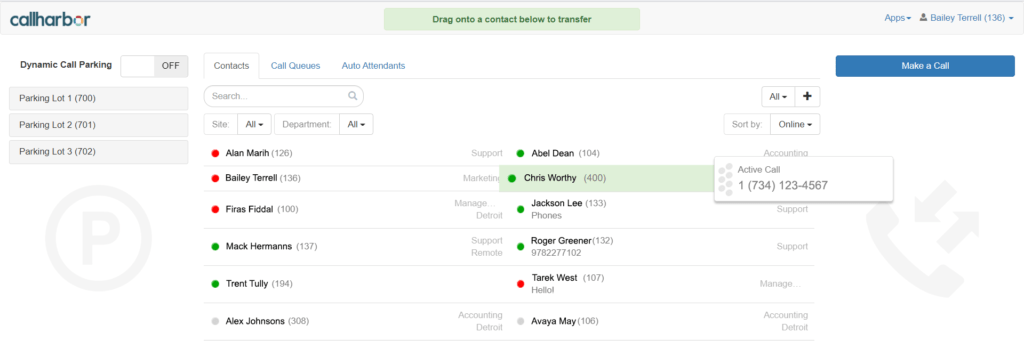
For anyone that answers a high volume of calls or has a lot of extensions to keep track of, our attendant console is a great feature to alleviate some stress. The list of users can be quickly dialed down by site and department, as well as organized into call queues and auto attendants. This feature can be pulled up on any web browser, and would work great on a tablet that can move with you.
When you have an active call, you can easily drag and drop it to another extension to transfer the call. You can also drag and drop the call into a parking lot, where the call will sit until someone picks it up by dialing the parking lot extension. The color of the circle next to a user’s name indicates their availability status. A red circle indicates that user is currently on a phone call. A green circle indicates they are available for a call. If the circle is gray, the user is offline. When transferring the call, you can also do an assisted transfer, where you can speak to your colleague first and give them info. You can also transfer right to voicemail, whether the user is available or busy.
Click to Call Your Coworkers
When using a softphone, you don’t need to remember your coworkers’ extensions to call them. When you find the name/extension on your CallHarbor web softphone Contacts list, you can choose voice and video call buttons. Click on either button to start a call in the app itself, and get on the phone with them with ease. You can also click to call from the mobile app, and within the manager portal itself. The days of scanning through a company directory before you can dial an extension are over.
CallHarbor Web Softphone: A Powerful Workday Sidekick
The examples of what our web softphone can do to reduce your workload may seem small, but they help your communication, and your workday in general, flow smoother. Utilizing your web softphone can boost your productivity, keep you connect, and give you more features & functionality than a desk phone by itself. Are you ready to start using your new workday sidekick?