
One thing that the pandemic showed is, is that it is completely possible for many people to work remotely. When in-person work became impossible, companies had to shift to sending people home to work. Handing out laptops, forwarding calls to cellphones, and hoping people would be productive was a common thing. As time passed though, many companies also found that remote work is extremely valuable for many reasons. Business everywhere find that they can save money, keep their employees happy, and be MORE productive. Many employees began enjoying the work-life balance that came along with remote work as well. They got to spend more time with their family and friends, go on longer vacations, and cut out their lengthy commute.
Taking a “workcation” means that you can enjoy the benefits of a vacation without putting your workload completely on hold. Many people have been able to spend an extra week on vacation without having to take time off, or spend long weekends visiting friends and family since they can take their work with them. In this blog post, we’ll learn about some do’s and don’ts of workcations, and why it may be a great option for you and your staff members if your business uses a hosted VoIP phone system.
What Is a Workcation?
Working remotely + Vacation = Workcation
You may be asking: How could you possibly work AND take a vacation at the same time? It’s entirely possible, and gives employees an amazing work-life balance. A large part of the business world has been successfully working from home for the past almost year and a half. A true work from anywhere situation gives you the flexibility to work remotely from any location. There is a huge difference between WFH and WFA, and we go more into detail in our previous blog post.
On a workcation, you put in your typical workday from anywhere you’ve traveled to. Whether you’re on your resort WiFi in Cabo, visiting your extended family in Southern Cali, or relaxing on a terrace in Barcelona, you can take less time off and still travel. After a full day of meetings, emails, and calls to clients, you have the freedom to go watch a sunset over the ocean, enjoy a breezy seaside dinner, or attend a nighttime concert of your favorite singer.
Taking a Workcation Instead of Using PTO
Taking a workcation can be very appealing. 10 days is the average number of PTO for private sector employees who have completed one year of service, according to the Bureau of Labor Statistics (BLS). That’s 2 working weeks for an entire year. When you take your work with you on trips, vacations & getaways, you can avoid using all of that PTO while still getting great work-life balance. You’re still putting in a full day of work—you’re just in a new, scenic location. You can save your actual vacation days for special trips, mental health days away from the computer, and vacations that you want to fully immerse yourself in.
Another benefit is that you don’t have to delay any important projects or assignments that are on your plate. You can continue to move forward on those tasks. Many people don’t take trip because they feel anxious about deadlines, and workcations are a good way to stay on top of things while still getting away.
How VoIP Helps Achieve a Productive Remote Work Vacation
Being able to work from anywhere and stay connected is a huge perk of utilizing a VoIP phone system. Your VoIP phone system utilizes any internet connection to make phone calls, video calls, SMS and more. This means you can use WiFi from any resort, AirBNB, cottage, etc. to complete your work calls and enter your video conference.
Mobile App & Web Softphone Connect You While You’re Away
Employees don’t need a physical desk phone with them to have complete control over their business phone number. With our CallHarbor Web Softphone and Mobile App, workers can make and take calls from anywhere.
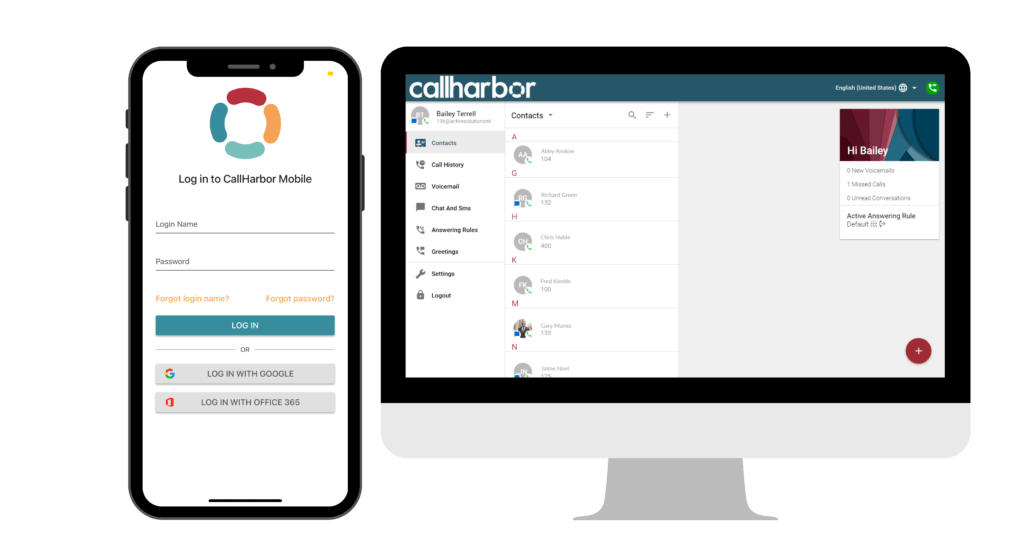
By using our mobile app or web softphone, employees don’t have to be tied to a specific desk. They can utilize their work phone number and all the other great VoIP phone system features from anywhere. You can start new phone calls right from the web softphone, begin new chat or SMS conversations with your coworkers, see your coworkers’ availability statuses, view your settings and toggle answering rules and greetings, and even more.
Tips For a Successful Workcation
Get Any Required Approvals Ahead of Time
Depending on what your flexible work situation is at your company, you need to make sure to get proper approvals. Making sure that you, your boss, and your team are on the same page is very important. For some work situations, you don’t even need to tell your boss, you can simply continue work as normal. If you usually have a hybrid work schedule, or if there is a big time difference, you’ll definitely need to keep everyone informed so they know what to expect/not expect from you.
Choose a Connected Location
Make sure that wherever you are going for your workcation, you are still connected. Being reachable and having a good internet connection is an important part of continuing work as normal. Going off the grid probably isn’t your best option!
Bring All Work Technology That You Need
Make a list of the tech and accessories you need ahead of time so you don’t forget anything. Each day the week before, note what you use/don’t use, so you have everything you need and aren’t toting around extra bulky gear. Whatever you need to power your productivity while working from a new place should be on your list too. It’s essential that you pack items like your work laptop, chargers, headset or headphones, thumb drives that you may need, etc. This will help you remain as productive as normal.
Think Security First & Foremost
With all of this work-sensitive hardware that you’ll have on hand, take precautions to secure it. Set up password protection on all of your devices, enable two-factor authentication, and make use of the hotel room safe. Be aware if the WiFi connection you are using is public, and what info you are sending out.
Communicate Your Schedule to Your Team
If you are working different hours than normal, and have gotten them approved by your boss, you’ll also want to inform your team. Whether it’s in an email, marking the hours on your calendar, or posting your availability each morning in your team’s messaging app, it’s important that your colleagues know when they can contact you. Remember, the key to making a workcation work is to be open and honest about when and how you can be reached.